
Is It Cheaper to Repair an Old Laptop or Buy a New One for College?
College is expensive enough. The last thing a student or a parent footing the bill wants is to decide whether that old laptop is worth saving. Maybe the battery barely lasts an hour. Maybe the screen has a crack running through half the display. Maybe it just crawls through every task.
The question still stands: spend money on fixing the old laptop or buy a new one for your kid’s next project. This guide gives an honest opinion. You’ll find typical repair costs vs the price of a new laptop, a clear rule for when each choice makes sense, and the college specific factors that tip the decision one way or the other.
The Simple Rule for Repair vs. Replace
Always start with the 50% rule. If the cost to repair a laptop exceeds 50% of what a comparable new laptop costs, replacing it usually makes more sense. If the repair comes in under that threshold, repair is typically the smarter money move.
Age and remaining lifespan decide the rest. A laptop that’s already five years old and needs a $150 fix might still lose if it’s likely to need another repair in six months.
What Common Laptop Repairs Cost vs. a New Laptop
Repair costs vary by make, model, and where you live, but the ranges below reflect what most people can expect across common fixes. Compare each against the 50% rule to see where it lands.
Battery Replacement
Battery replacement ranks among the cheapest and most worthwhile fixes a laptop can get. A dying battery that won’t hold a charge is one of the most common problems in older models. The fix is usually low cost relative to buying new. If the rest of the laptop is in good shape, looking for a professional laptop battery replacement is almost always worth it.
Screen Repair
A cracked or dead screen is another common laptop issue. Cost varies widely by model and screen type. On a budget laptop, screen repair can climb toward replacement territory. On a mid-range or premium laptop, it’s often well worth fixing, especially if the rest of the laptop has years of life left.
Storage or RAM Upgrade
This is the best upgrade for a slow laptop. Swapping an older mechanical drive for a super fast SSD upgrade, or adding more RAM, can make an aging laptop significantly faster at a fraction of the cost of a new computer. If your device is stalling under basic student multitasking, this is almost always the first thing to try.
Keyboard or Charging Port
A keyboard that stops registering keys or a charging port that won’t connect are frustrating but fixable and usually worth fixing on a laptop that’s otherwise healthy and not too old.
Logic Board or Liquid Damage
Motherboard failures and liquid damage repairs can approach or exceed half the cost of a replacement laptop, especially on older or budget models. This is where the 50% rule most commonly triggers a replacement decision.
When Repairing Your Old Laptop Makes More Sense for College
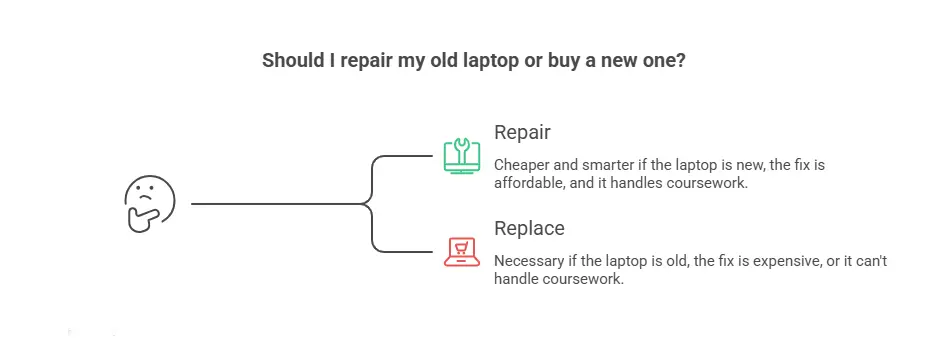
If the laptop is only a few years old and one affordable part is the problem, repair is almost always the cheaper, smarter call for college.
Avoiding Data Migration During a Busy Semester: Repairing keeps all files, programs, and settings intact. Buying a new device means migrating everything to the new device.
The Laptop Is Under Four Years Old: Newer laptops have plenty of usable life ahead. A single affordable fix on a three-year-old laptop can buy two or three more years of reliable use; far better value than replacing it.
The Fix Is Cheap Relative to the Laptop’s Value: A battery fix, component upgrade, RAM addition, charging port fix, or a single failed part on an otherwise solid device, repair wins.
It Still Handles the Student’s Coursework: If the laptop handles writing, browsing, video calls, and standard coursework software, and only one thing is broken, replacing the whole device wastes money. Fix only the broken part, not the working ones.
When is Buying a New Laptop the Smart Choice?
If the laptop is aging, the repair is costly, or the major demands more power, a new laptop is the better long-term value, even though it costs more in the beginning.
- The Laptop Is Five or More Years Old: Even after a repair, other components are likely to fail soon. Repairing a five-year-old laptop means fixing it again in six months.
- The Repair Is Expensive: Logic board failures, liquid damage, or multiple parts failing at once can push repair costs past the 50% threshold. At that point, the money is better put toward something with warranty coverage and current specs.
- The Major Demands More Power: Engineering, architecture, graphic design, and video production need heavy software that older hardware simply can’t handle. A repair won’t fix a performance gap.
- You Want Four Years of Reliable Use: A new laptop with a warranty and modern specs can carry a student through an entire degree.
Frequently Asked Questions
Is it cheaper to repair a laptop or buy a new one?
It depends on the repair cost relative to the laptop’s value. If the repair costs more than half the price of a comparable new laptop, replacing it is usually smarter. Cheaper fixes, like a battery replacement or SSD upgrade, almost always favor repair.
At what age is a laptop not worth repairing?
Around five years or older, other components are more likely to fail soon, making an expensive repair a poor investment. A cheap fix can still be worth it on an older laptop, but a costly one usually signals it’s time to replace.
What kind of laptop does a college student actually need?
For most majors, a laptop that handles writing, browsing, video calls, and standard software is plenty, which is why repairing a capable older laptop often makes more sense. Students in design, engineering, or video-heavy programs may need more power than an older device can deliver.
Will repairing my laptop keep all my files and programs?
Yes. Most repairs leave data, programs, and settings completely intact. Buying new requires migrating everything, an underrated hassle during a busy semester. Repair wins on convenience alone when timing is tight.
Not Sure Which Way to Go? Get It Diagnosed First
The repair vs replace decision depends entirely on one number: the actual repair cost. Without that, the decision is a random guess. That’s why EZ Laptop Repair offers a free diagnostic, where no work gets started without approval.
The diagnostic gives the facts needed to make a confident call. Repair or replace before spending a dollar on either. Not sure if the laptop is worth saving before the semester starts? Reach out to book a free diagnostic with EZ Laptop Repairs.
EZ Laptop Repairs serves students and families with laptop repairs across the Las Vegas area, including Summerlin, Henderson, North Las Vegas, Spring Valley, Centennial Hills, Green Valley, Aliante, Boulder City, Enterprise, and the surrounding communities.
