Search on this blog

Search on this blog

Same day Service

90 days labor guarantee

1 year parts warranty

Free Diagnosis

ez laptop repair

Expert Help for Laptop Water Damage Before It's Too Late

The most damaging thing you can do after a liquid spill is power the laptop on. Turn it off immediately and bring it to us. The sooner it's here, the better the results.

25

Year of Experience

Welcome to ez laptop repair

Professional Laptop Water Damage Repair Las Vegas Starts Here

A liquid spill doesn't always destroy a laptop. But waiting too long can. Even a small amount of moisture can begin corroding internal components within hours, leading to power failures, keyboard issues, charging problems, or complete motherboard failure. EZ Laptop Repair provides same day laptop water damage repair in Las Vegas starting from $75. We handle liquid spills from water, coffee, juice, and other beverages across all major brands, including Dell, HP, Lenovo, Apple MacBook, Asus, Acer, Microsoft Surface, and more

What We Check During Laptop Water Damage Repair?

A laptop may appear dry on the outside while moisture continues to damage internal components. Corrosion, short circuits, and oxidation can develop long after the spill occurs. During every inspection, we identify the affected parts and recommend only the repairs your laptop needs.

Laptop Won't Turn On

Users complain of short circuits from liquid contact with the motherboard. From the power circuit, charging IC to the main board, we perform component level troubleshooting to identify where the electrical failure is before recommending a repair. Sometime thorough cleaning and corrosion removal restore the device's function.

Keyboard Liquid Damage

The keyboard is the first point of contact in most spills. Liquid travels through the keys into the membrane or the board beneath, leaving keys sticky, unresponsive, or registering wrong inputs. We check whether the keyboard is recoverable or needs replacement, and check the board beneath for secondary damage at the same time.

Screen Damage After a Liquid Spill

Liquid reaching the display causes discolouration, watermarks behind the panel, or sections that go dark. Our Comp TIA A+ technicians examine the display, backlight, and all connections to the board separately. They replace only what's failed rather than the full assembly by default.

Motherboard and Internal Corrosion

Liquid reaching the motherboard causes corrosion on solder joints and circuit traces that worsens with time. With ultrasonic cleaning on affected boards, we remove corrosion at the component level and test each part independently. Not every water damaged motherboard needs replacing. But we'll tell you honestly when one does at the diagnostics stage.

Charging and Power Issues After Liquid Contact

A laptop that won't charge or works randomly with the power adapter after a liquid or coffee spill often has damage to the charging circuit rather than the port itself. Our laptop water damage repair services in Las Vegas cover a complete evaluation of the charging IC, power rail, or port before replacing anything. But we'll explain you everything after diagnosis.

Data Recovery From a Water Damaged Laptop

A laptop that can't be repaired can still have its data recovered. We analyze the storage device separately from board. If the SSD or hard drive is intact, data recovery is possible even when the laptop itself is beyond saving. Our experts confirm the data recovery at the diagnostic stage, so you can make the right decision.

Not All Liquid Spills Cause the Same Damage

Not all spills are equal. Water causes the least damage if the laptop is switched off immediately. Coffee, tea, juice, or soft drinks leave conductive residue that increases corrosion over time. Alcohol based drinks evaporate more quickly but can still damage protective coatings and sensitive electronic components. If possible, let us know what was spilled when you bring your laptop in. This helps our technicians choose the most effective cleaning and repair process from the start.

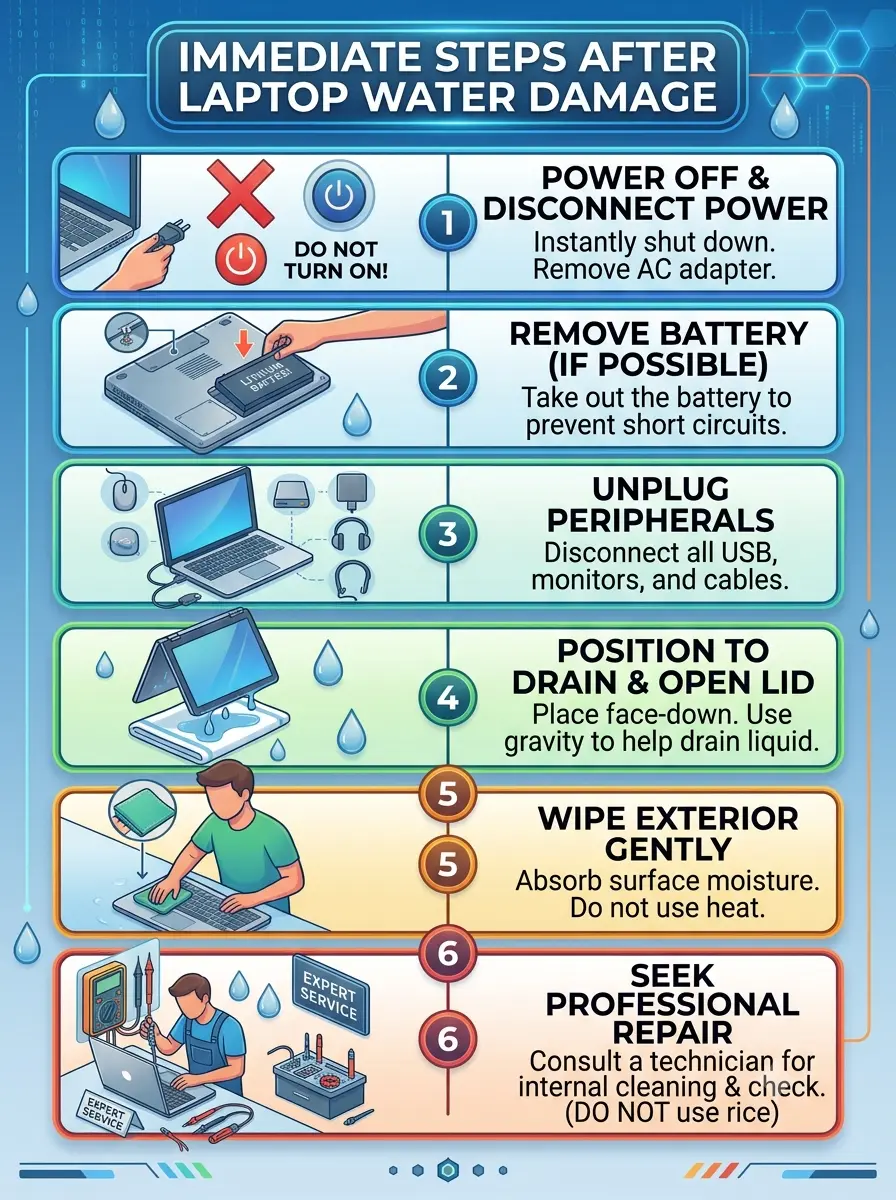
Immediate Steps to Take After Laptop Water Damage

Most of the damage from a liquid spill doesn't come from the liquid itself. It comes from powering the laptop on while it's still wet. What you do in the first few minutes directly affects what's repairable. Proactively follow these steps:

1.Turn the laptop off completely. Do not leave it in Sleep mode. Hold the power button until it shuts down.
2.Disconnect the charger and remove any connected devices or accessories.
3.Avoid using a hair dryer or other heat sources, as excessive heat can worsen internal damage.
4.Don't place the laptop in rice. It won't remove liquid from inside the device.
5.Bring the laptop in for professional inspection as soon as possible. The window between a recoverable spill and a corroded board is measured in hours.

steps after liquid damage repair

What Sets Our Las Vegas Water Damage Repair Services Apart?

Liquid damage separates shops that do it properly from shops that attempt it. The difference shows up six weeks later when corrosion that wasn’t fully removed causes a new failure. Here’s what we do differently:

We Repair Before We Recommend Replacement

Whenever possible, we focus on repairing damaged components instead of replacing expensive PC parts. This approach often reduces repair costs while extending the life of your laptop .

Local, Trusted Repair Service

All diagnostics and repairs are completed by our technicians in our Las Vegas shop, keeping your device secure and ensuring direct quality control.

Brand Expertise

We repair liquid damaged laptops from Apple, Dell, HP, Lenovo, ASUS, Acer, MSI, Samsung, Microsoft Surface, and many other manufacturers.

Your Data Is Always a Priority

Many customers are more concerned about their files than the laptop itself. Throughout the repair process, we take every precaution to protect your data and discuss recovery options if the device cannot be repaired.

Gadget Specialist

Don't Wait to Repair Your Water Damaged Laptop in Vegas

We Offer Laptop Water Damage Repair Across All Major Brands

Liquid damage affects every brand differently depending on chassis design, logic board position, and how tightly the device is sealed. Here’s what we see per brand in our Las Vegas shop:

Dell Laptop Water Damage Repair

Dell XPS laptops draw air through a below keyboard intake that pulls liquid toward the motherboard faster than most designs. Inspiron and Latitude models have better separation between keyboard and board. We handle Dell liquid damage at the component level across all current and recent models for XPS, Inspiron, Latitude, and Alienware.

HP Laptop Water Damage Repair

HP EliteBook laptops have spill resistant keyboards that channel liquid away, but large spills still reach internal components. Omen gaming units have open chassis designs that spread liquid across a wider area. Our laptop repair experts assess each HP model's layout before beginning any repair.

Lenovo Laptop Water Damage Repair

Lenovo ThinkPad models are built with a drainage channel designed to route liquid away from the board, making them the most spill resistant laptops we work on. That system handles moderate spills, but sugary drinks still reach the board. Yoga models are more vulnerable due to their 360-degree hinge design. We handle all Lenovo liquid damage in our Las Vegas shop.

Apple MacBook Water Damage Repair

MacBook liquid damage is handled by our Apple-certified technicians using component-level logic board repair procedures. Apple's proprietary board design requires specific diagnostic approaches. We repair at the component level rather than defaulting to an unnecessary logic board replacement.

Asus Laptop Water Damage Repair

Asus ROG and TUF gaming laptops have larger chassis with more internal surface area for liquid to spread across. We thoroughly check the keyboard, display cable, and board simultaneously on every Asus water damage case because liquid rarely reaches only one component.

Acer Laptop Water Damage Repair

Acer Aspire models are among the most common water damage cases we handle in Las Vegas. The slim chassis gives liquid a direct path to the board. Every Acer water damage case starts with full disassembly and component-level troubleshooting to evaluate the damage extent.

Microsoft Surface Water Damage Repair

Surface Pro and Surface Laptop water damage requires precision handling. The adhesive assembly makes disassembly more complex, and the proprietary board design needs component level diagnosis. We examine the board, display, and storage device separately.

Samsung Laptop Water Damage Repair

Our Las Vegas laptop computer repair shop handles water damage for all Samsung Galaxy models. Galaxy Book 360 models add hinge complexity to disassembly. We clean the board, review corrosion on all affected parts, and confirm function across all ports and connectors before returning any Samsung device.

MSI Laptop Water Damage Repair

MSI gaming and creator laptops have open chassis designs that spread liquid quickly across multiple components. Our experts deal with MSI Creator, Stealth, and gaming series water damage with component level assessment of the board, GPU module, and keyboard daily.

Alienware Laptop Water Damage Repair

Alienware M15, M17, and X-series liquid damage cases need careful handling of the multi-zone board layout. Liquid reaching an Alienware board can affect the GPU, power delivery, and display controller simultaneously. We evaluate each section independently and repair at the component level

FAQs

Questions People Ask Before Bringing Water Damaged Laptops to Our Las Vegas Shop

Power it off immediately. Hold the power button until it shuts down. Unplug the charger, remove any connected devices, and bring it to our Las Vegas shop as soon as possible. Don't use a hair dryer, don't press keys, and don't put it in rice. Speed is the biggest factor in determining how much of your device is recoverable.

In most cases, yes, especially if the device was powered off quickly and brought in the same day. The extent of the repair depends on how far the liquid spread, which components it reached, and how long it sat wet. We assess all of this at the free diagnostic and tell you exactly what's repairable before any work begins.

Laptop water damage repair at EZ Laptop Repair starts from $75. The final cost depends on which components were affected. For example, a keyboard replacement costs less than a component level logic board repair. We’ll tell you the final cost after the troubleshooting.

No, this is the single most damaging thing you can do. Powering on a wet laptop pushes electrical current through moisture, which causes short circuits and accelerates corrosion. Turn it off, keep it off, and bring it in.

Keyboard replacements and cleaning jobs are completed the same day for most models. Component level logic board repairs and corrosion removal take longer. We give you an accurate timeframe at the diagnosis.

In many cases, yes. If the storage device wasn't directly damaged, data recovery is possible even when the laptop itself can't be repaired. We assess the drive or SSD separately as part of the water damage diagnostic and confirm the data recovery service before you commit to any cost.

It depends on the laptop's age, value, and extent of damage. For a laptop under three years old with damage confined to the keyboard or a single board component, repair almost always makes sense. For an older device with extensive corrosion, it may not.

Yes. Coffee, juice, and soft drinks contain sugars and acids that accelerate corrosion on circuit board traces far faster than plain water. If the spill involved anything other than water, treat it as more urgent — bring it in immediately and tell us what the liquid was when you arrive.