
Choosing between the Microsoft Surface Laptop and the Microsoft Surface Pro isn’t about picking the more powerful device. It’s about choosing the one that fits how you work.
Both devices are Microsoft’s flagship Copilot+ PCs, powered by Qualcomm Snapdragon X processors and equipped with dedicated Neural Processing Units (NPUs) that empower AI features directly on the device. They deliver excellent battery life, fast everyday performance, and the latest Windows 11 experience.
The biggest difference is their design. The Surface Laptop is a traditional notebook built for productivity. The Surface Pro is a 2-in-1 device that transforms from a tablet into a laptop with an optional keyboard.
Remember, the “better” device isn’t the one with the longest specification sheet. It’s the one that matches your daily workflow. This guide compares both models to help you make the right buying decision.
Surface Laptop or Surface Pro? Here’s the Answer
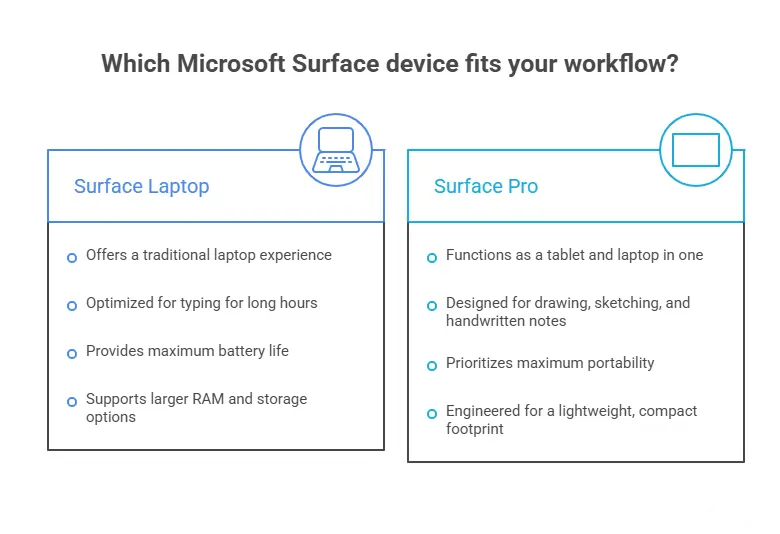
If you mainly work with documents, spreadsheets, emails, or spend long hours typing, the Microsoft Surface Laptop is the better choice. Its integrated keyboard, longer battery life, and traditional laptop design make it ideal for productivity.
If you prefer writing with a stylus, sketching ideas, taking handwritten notes, or carrying one device that works as both a tablet and a laptop, the Microsoft Surface Pro offers significantly more flexibility.
Both devices deliver excellent performance, run Windows 11, and support Microsoft’s Copilot+ AI features. The right choice depends less on performance and more on how you plan to use the device every day.
Microsoft Surface Laptop vs. Surface Pro | ||
Feature | Surface Laptop | Surface Pro |
Best For | Productivity & Office Work | Creativity & Mobility |
Form Factor | Traditional Laptop | 2-in-1 Tablet + Laptop |
Keyboard | Included | Sold Separately |
Display | PixelSense Touchscreen | LCD or OLED Options |
Stylus Support | Basic | Excellent |
Battery Life | Longer | All Day Battery |
Copilot+ AI | Yes | Yes |
Traditional Design Laptop or 2-in-1 Tablet?
The first thing you’ll notice is how differently these devices are designed. The Surface Laptop follows the usual laptop layout with a fixed keyboard, large trackpad, and sturdy hinge. Open the lid and start working. There are no accessories to attach or setup required.
The Surface Pro, however, is designed around flexibility. It includes a built-in kickstand and transforms into a laptop only after connecting Microsoft’s detachable keyboard. Remove the keyboard, and it becomes a lightweight Windows tablet for reading, drawing, or taking notes.
Neither design is inherently better. Overall, people who primarily type tend to prefer the Surface Laptop, while users who regularly draw, present, or travel appreciate the versatility of the Surface Pro.
Surface Laptop vs. Surface Pro Performance Comparison
Performance is one of the biggest reasons people compare these two Surface devices. The good news is that you won’t notice a significant difference during everyday use.
Both the Surface Laptop and Surface Pro are powered by Qualcomm’s latest Snapdragon X Series processors, paired with dedicated Neural Processing Units (NPUs) capable of running Microsoft’s Copilot+ AI features directly on the device. Whether you choose a Snapdragon X Elite or Snapdragon X Plus configuration, both systems are built to handle modern Windows workloads efficiently.
For most users, both devices perform exceptionally well when:
- Working in Microsoft Office
- Managing dozens of browser tabs
- Attending Microsoft Teams or Zoom meetings
- Editing photos
- Programming or web development
- Streaming videos
- Using AI-powered Windows features
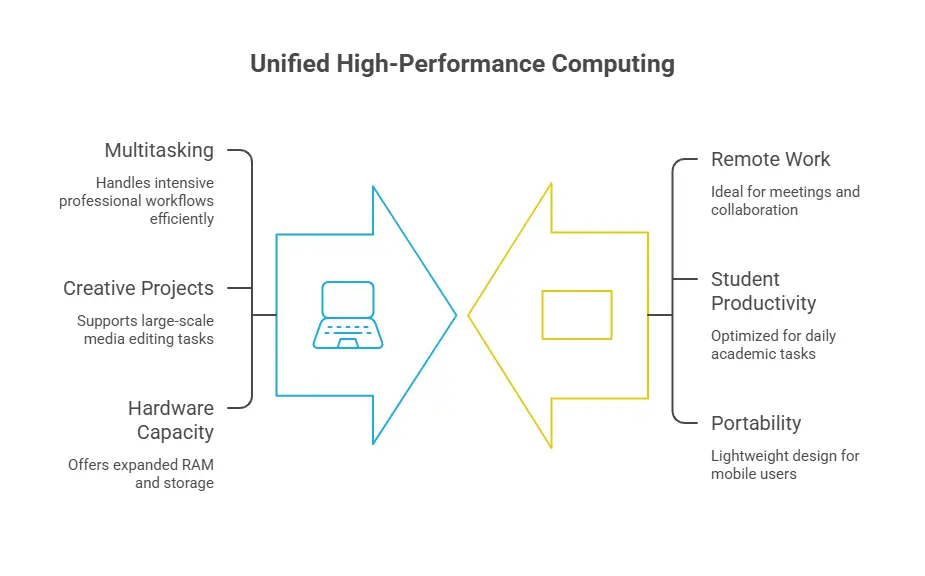
The Surface Laptop has an advantage for users who consistently run high workloads. Higher-end configurations offer more RAM and larger SSD options, making it a better fit for professionals who regularly multitask or work with larger creative projects.
For students, remote workers, and everyday users, however, performance should not be the deciding factor. Both devices are fast enough for nearly every common productivity task.
Which Surface Laptop Has the Better Display?
If display quality is important to your work, stick around. The Surface Laptop features Microsoft’s well-known PixelSense touchscreen, offering sharp visuals, accurate colors, and a comfortable viewing experience for everyday productivity. It’s an excellent display for writing, web browsing, video calls, and entertainment.
The Surface Pro takes things a step further by offering both LCD and OLED display options, depending on the model you choose. This model is available with either:
- 12-inch PixelSense LCD
- 13-inch OLED display
The OLED version delivers:
- Deeper blacks
- Better contrast
- More vibrant colors
- Improved HDR experience
Creative professionals who edit photos, watch HDR content, or value color accuracy will appreciate the OLED display. For office work, web browsing, online classes, and productivity, the Surface Laptop’s PixelSense display proves to be excellent and more than capable.
Battery Life – Which Surface Lasts Longer?
Battery life is another area where the Surface Laptop has an advantage. Microsoft rates some Surface Laptop models for up to 27 hours of local video playback, making them among the longest-lasting Windows laptops available. For any laptop, battery life naturally depends on:
- Screen brightness
- Workload
- Applications
- Wireless connectivity
Even so, the Surface Laptop generally lasts longer between charges than the Surface Pro. The Surface Pro still delivers enough battery for a typical workday. But for long flights, conferences, or full campus days, the Surface Laptop offers more durability.
Are Copilot+ AI Features Worth It?
Artificial intelligence is one of Microsoft’s biggest selling points for its newest Surface lineup, but many buyers still wonder whether these features genuinely improve everyday work or simply add marketing appeal.
Both the Surface Laptop and Surface Pro qualify as Copilot+ PCs, meaning they include dedicated AI hardware capable of processing many AI tasks directly on the device instead of relying entirely on cloud services. Some of the most useful features include:
- Recall, which helps you quickly find previously viewed files, webpages, and documents.
- Click to Do, allowing you to interact with text and images using AI-powered actions.
- Live Captions, providing real-time translations during meetings and videos.
- Windows Studio Effects, which enhance webcam quality by reducing background noise, maintaining eye contact, and improving lighting during video calls.
- Microsoft Copilot, which assists with writing, brainstorming, summarizing documents, and everyday productivity tasks.
Since both devices use similar AI hardware, neither offers a significant advantage in AI performance. Instead, your overall experience depends more on whether you prefer using these features on a traditional laptop or a flexible 2-in-1 device.
The Hidden Costs Most Buyers Don’t Consider
When comparing prices, many shoppers focus only on the advertised starting price. In reality, the total cost of ownership can be quite different. The Surface Laptop includes everything you need to start working immediately. A built-in keyboard, large precision trackpad, and touchscreen display all come standard.
The Surface Pro, on the other hand, is designed as a modular device. While this flexibility is one of its biggest strengths, it also means many users purchase additional accessories, such as:
- Surface Pro Keyboard
- Surface Slim Pen
- Surface Dock
- Protective case or sleeve
By the time these accessories are added, the overall investment often comes much closer to the cost of a similarly configured Surface Laptop. This doesn’t make the Surface Pro poor value. It simply means buyers should compare the complete setup rather than the base price alone.
Before making your decision, think about how you’ll use your device every day. Choosing the Surface that naturally fits your workflow is often more valuable than selecting the one with the longest feature list or the lowest advertised price.
Repairability and Long-Term Ownership
No matter which Surface device you choose, it’s worth considering long-term maintenance before making your purchase. Microsoft Surface devices are known for their slim and premium design, but that also means repairs require specialized tools and experience.
Common repairs include:
- Cracked display replacement
- Battery replacement
- Charging port repair
- Keyboard replacement
- SSD upgrades (supported models)
- Windows recovery and software troubleshooting
Choose the Surface Laptop If You | Choose the Surface Pro If You: |
Want a traditional laptop experience | Want a tablet and laptop in one device |
Type for long hours | Draw, sketch, or take handwritten notes |
Need maximum battery life | Travel frequently |
Prefer a built-in keyboard | Need stylus support |
Want larger RAM and storage options | Prefer maximum portability |
At EZ Laptop Repair, we regularly repair Microsoft Surface devices for customers throughout Las Vegas. One of the most common issues we see is accidental screen damage, especially on Surface Pro models that are frequently carried between meetings, classrooms, or job sites without a protective case. Using a quality sleeve or protective case can significantly reduce the risk of costly repairs later.
Final Verdict
The Microsoft Surface Laptop and Microsoft Surface Pro are both excellent Windows devices, but they serve different users. Choose the Surface Laptop if your priority is productivity, long battery life, and a traditional laptop experience. Its integrated keyboard, larger configuration options, and dependable performance make it the better choice for professionals, students, and anyone who spends hours working at a desk.
Choose the Surface Pro if flexibility matters most. Its detachable design, stylus support, and lightweight form factor make it ideal for artists, students, travelers, and users who want both a tablet and a laptop in one device.
Neither option is universally better. The right choice depends on how you work every day.
If you’re still deciding, ask yourself one simple question:
Do you primarily type, or do you regularly draw, write by hand, and work on the move?
Your answer will usually point you toward the right Surface.